Outpatient visit
- 1Book the appointment
- 2Confirm it
- 3Start the OPD consultation
- 4Prescribe and complete
- 5Invoice the consultation fee
HOSPITAL OPERATIONS · BUILT ON ODOO 20
Run patients, consultations, wards, lab, pharmacy and billing from one hospital record. Built on standard Odoo 20 apps (Employees, Invoicing and Inventory), with a screen for every hospital role from the front desk to the pharmacy, and an AI assistant that answers questions about the hospital's data. Open the demo and click through the real thing.
Patients & Appointments
Patient register, slot booking from each doctor's schedule, referrals and video consultations.
Clinical Care
OPD consultations with vitals and prescriptions, IPD admissions through to discharge.
Wards, Lab & Pharmacy
A live bed map, lab requests with flagged results, dispensing from inventory.
Billing & Insurance
Invoices from visits, tests and prescriptions, with the insurer's share split off.
THE BIG PICTURE
A patient's day crosses the front desk, the consulting room, the ward, the lab, the pharmacy and the billing counter, and each of them needs what the one before it wrote down. When those live in separate tools, staff re-type the same patient at every step and nobody can say how many beds are free or which invoices are still unpaid without asking around. Here every step reads and writes the same Odoo database: the appointment becomes the consultation, the consultation carries its prescription and lab requests, the admission holds its bed, and each of them can be billed in one click.
PATIENTS & APPOINTMENTS
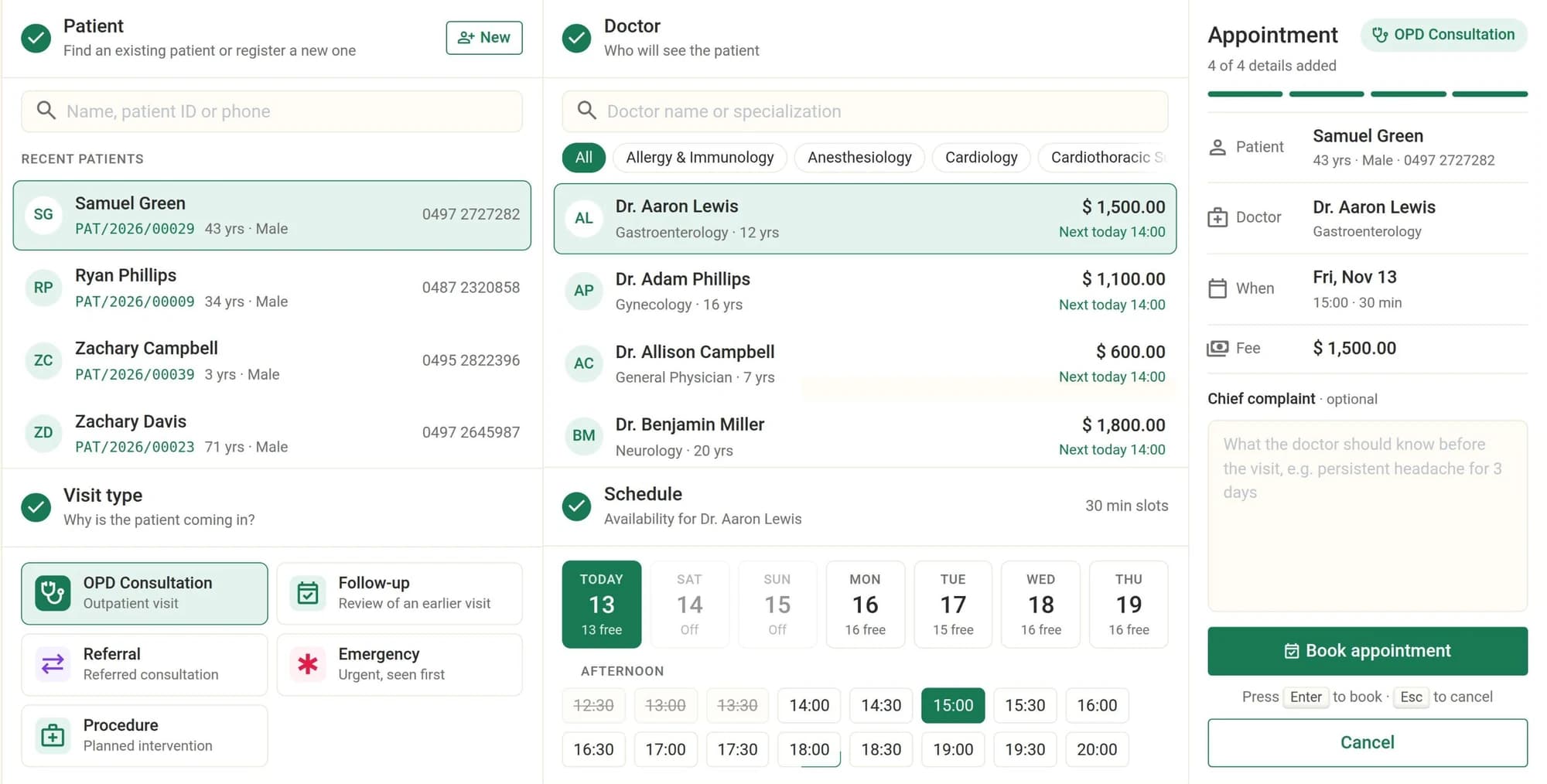
Each patient gets an ID, with blood group, known allergies, chronic conditions and an emergency contact on file, and their appointments, OPD visits, admissions and referrals are counted on the same record.
The booking screen offers the next seven days, built from each doctor's Working Schedule in Odoo. Days off show as off, past slots are ruled out, and the doctor's consultation fee is shown before you book.
A patient can't hold two active appointments at the same date and time, and each booking is typed as an OPD consultation, follow-up, referral, emergency or procedure, with a priority.
OPD CONSULTATION
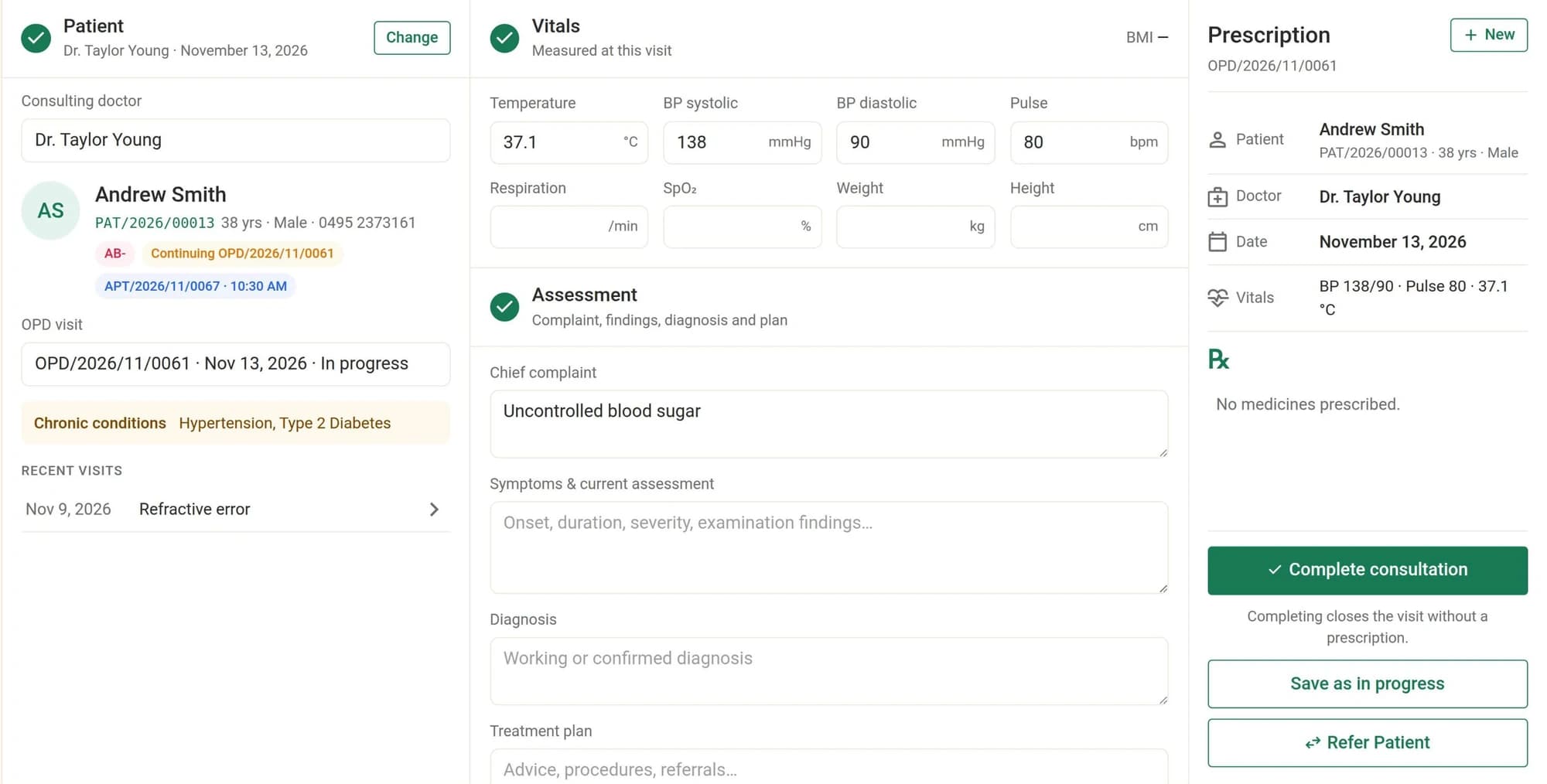
Temperature, blood pressure, pulse, respiration, SpO₂, weight and height (BMI is worked out for you), then complaint, symptoms, diagnosis, treatment plan and a follow-up date, with the patient's chronic conditions and recent visits alongside.
Add medicines with dose, frequency, duration and route and watch the prescription preview fill in. The visit and its prescription are saved together, and completing the visit confirms the prescription.
Refer the patient to another specialization or doctor from the same screen. The referral moves from pending to booked to completed as its appointment does.
A doctor records consultations and admissions only under their own name and sees only their own appointments, consultations, admissions, prescriptions and lab requests.
IPD, WARDS & BEDS
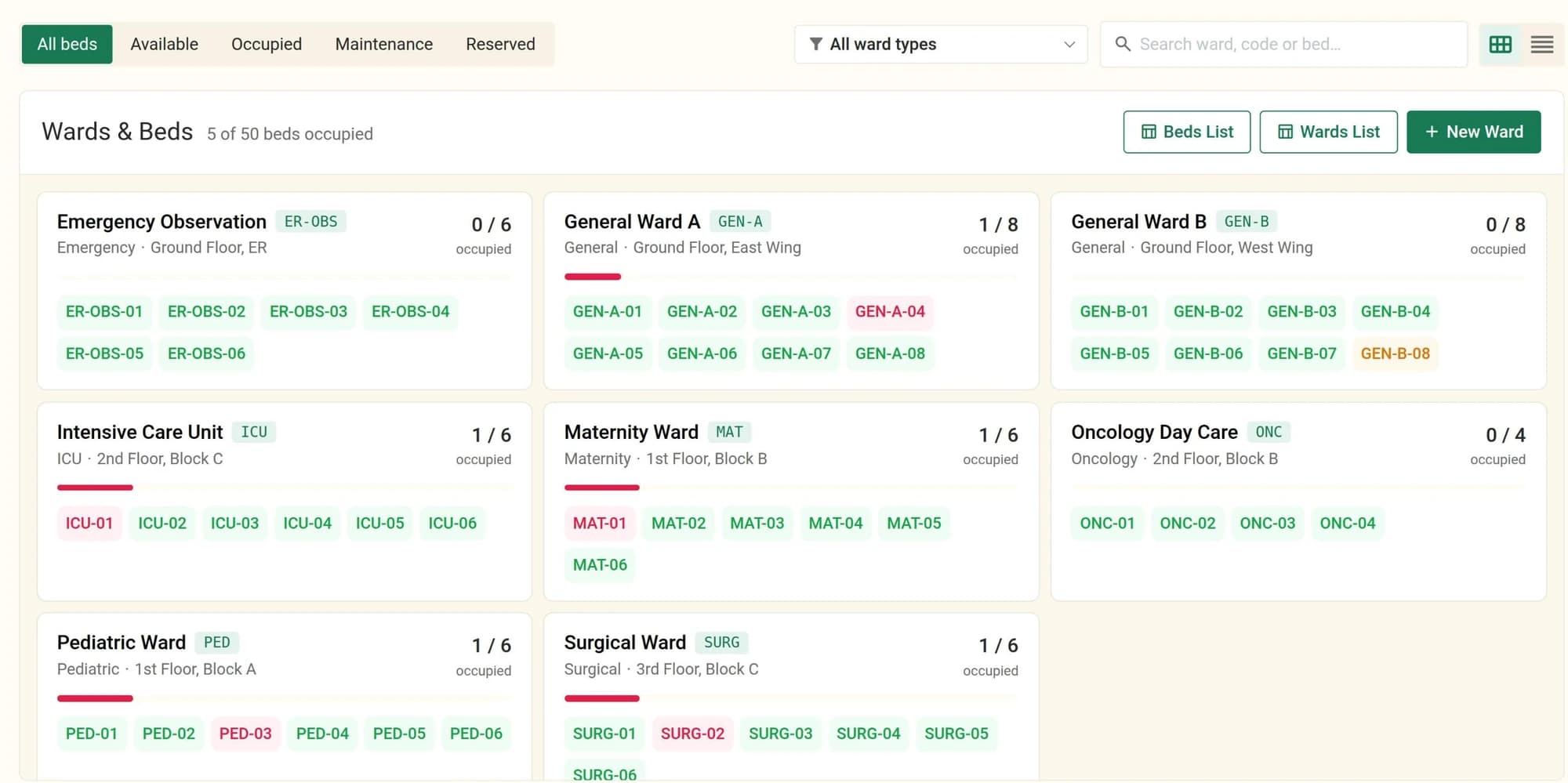
Each ward shows its occupancy and every bed by status: available, occupied, under maintenance or reserved. Wards can be general, ICU, emergency, maternity, pediatric, surgical, psychiatric or oncology.
Admitting a patient claims the chosen bed, and a bed that is already occupied can't be taken by a second admission.
A patient can't be discharged without a discharge summary. Discharging frees the bed, records the time and closes the length of stay.
Diagnosis, treatment notes, diet type, prescriptions and lab requests all hang off the admission.
LABORATORY & PHARMACY
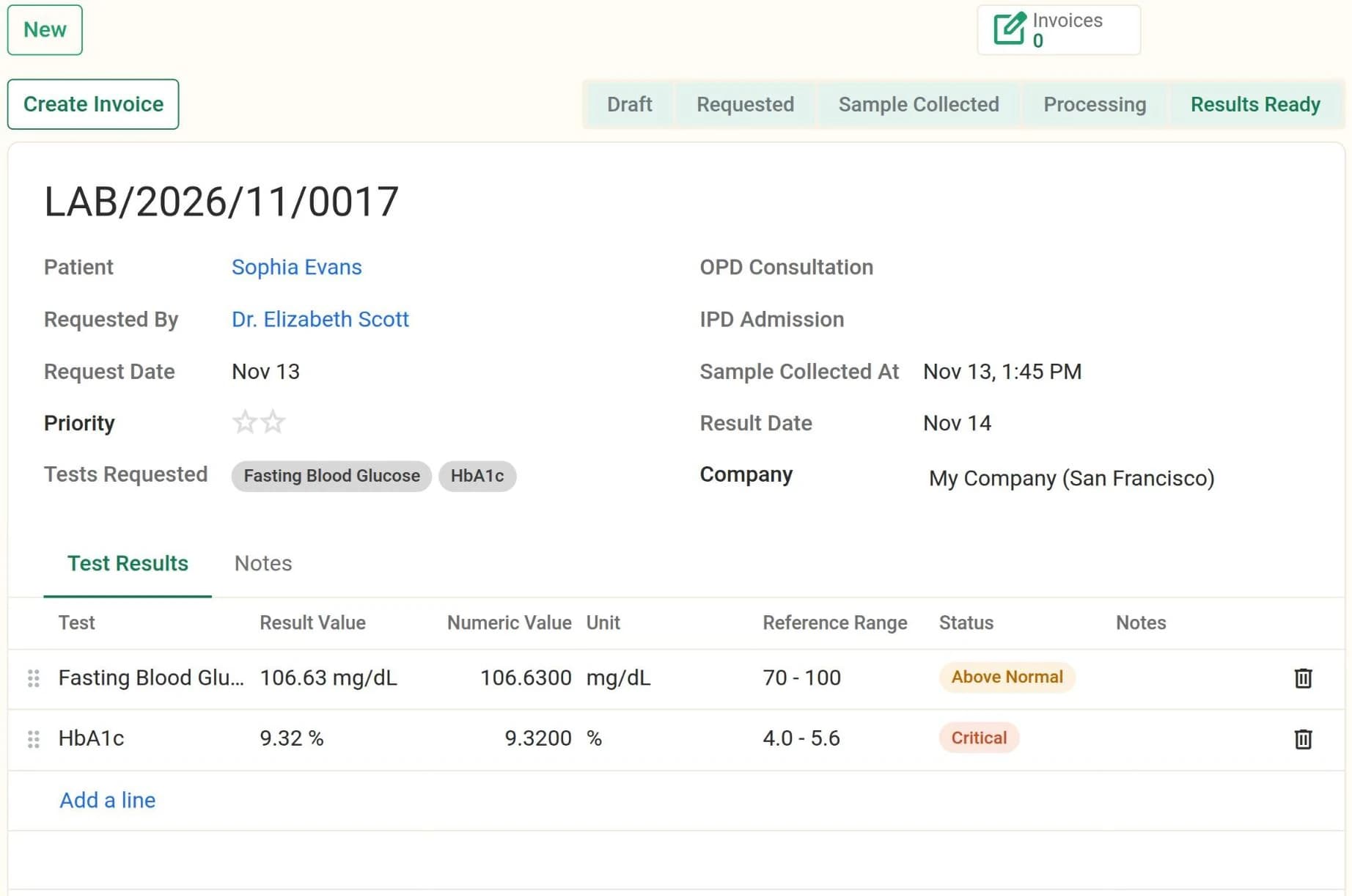
Each request moves from requested to sample collected (time-stamped) to processing to results ready. Only lab technicians and managers handle samples and results.
Numeric results are checked against the test's normal range and flagged below normal, above normal, or critical when they fall more than 20% outside it. A catalogue of 40 common tests ships with the module, each with its category, unit and reference range, ready for your own prices.
Doctors confirm prescriptions and pharmacists dispense them, and dispensing creates and validates a delivery order in Odoo Inventory, so medicine stock goes down as it leaves the pharmacy.
Prescriptions and lab reports print as PDFs.
BILLING & INSURANCE
Create the invoice from the appointment or OPD visit (the doctor's consultation fee), the lab request (each test's price) or the prescription (each medicine's price). An IPD admission gets a draft invoice linked to the stay, for the billing officer to complete.
Set the insurer and coverage on the invoice. When it is posted, every line is split: the patient keeps their share and a second invoice for the insurer's share is created and posted with it. The pair is cancelled together.
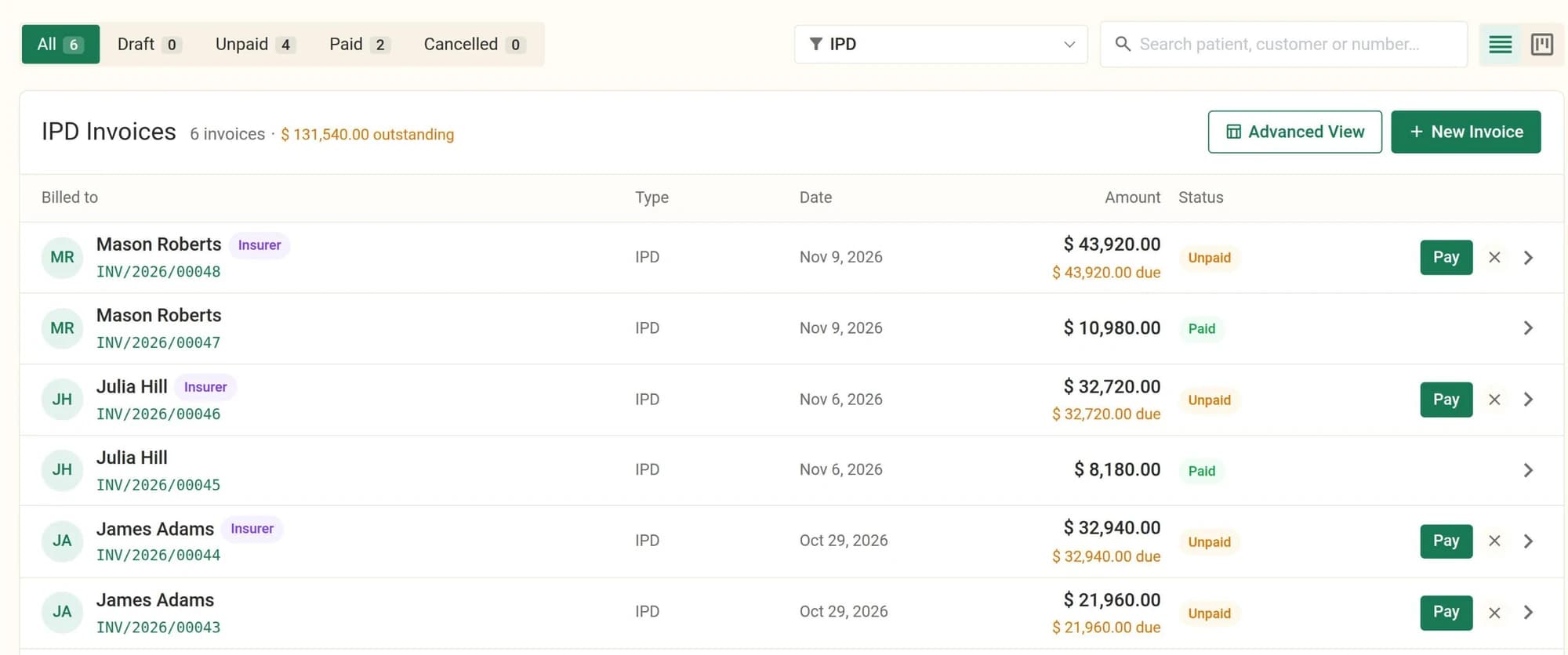
OPD, IPD, lab and pharmacy invoices each have their own list, with Draft, Unpaid, Paid and Cancelled tabs, the count in each and the amount outstanding. Payments use Odoo's own invoice payments.
ONLINE CONSULTATIONS
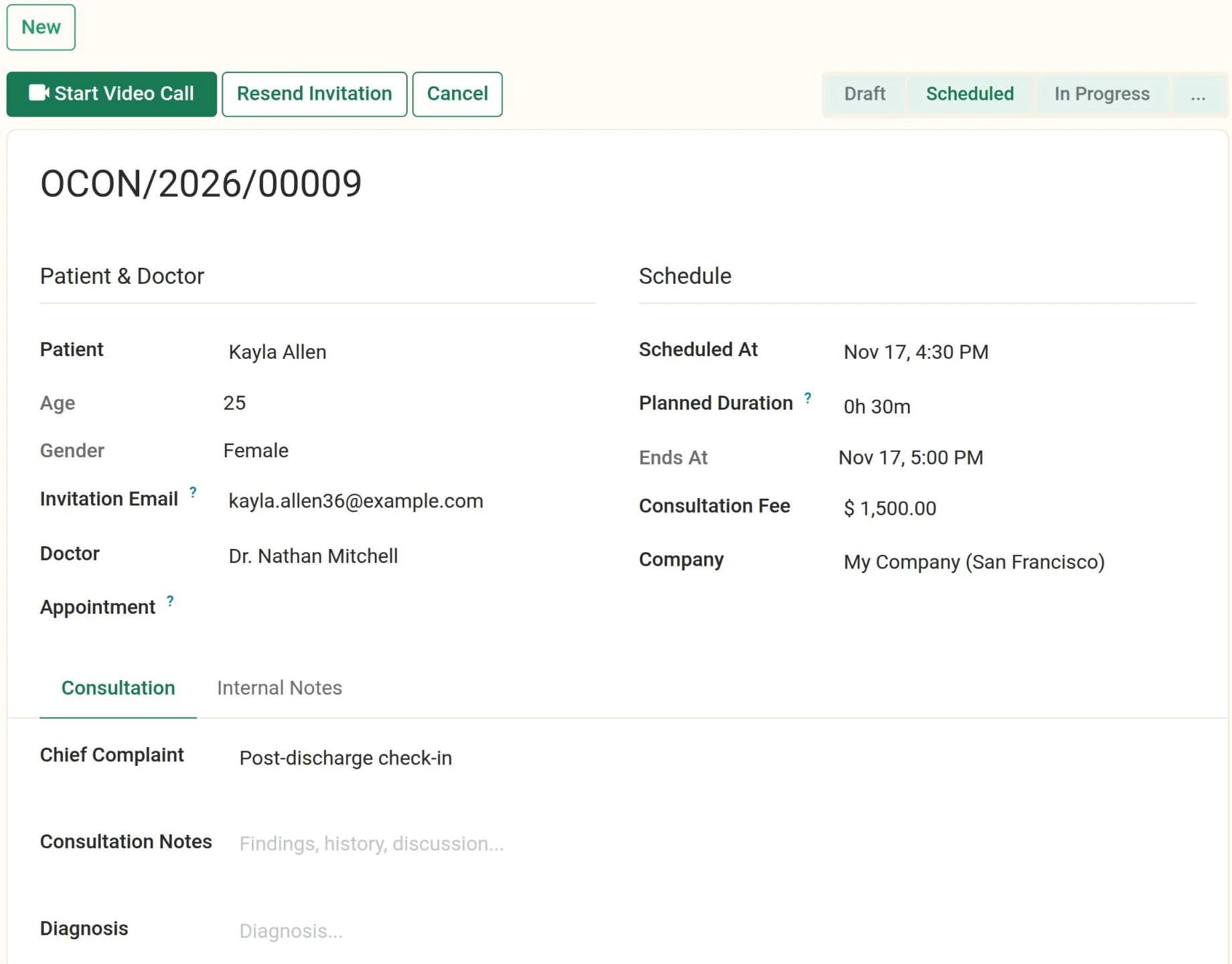
Scheduling a consultation creates a private Odoo Discuss room. The patient gets an email invitation and joins from a browser as a guest, with no account or app to install.
A doctor can't have two consultations that overlap, and neither can a patient. The doctor's consultation fee is filled in for you.
Call start and end times are recorded with the actual duration, alongside notes, diagnosis, advice, a follow-up date and a prescription written from the consultation.
MEDICO AI
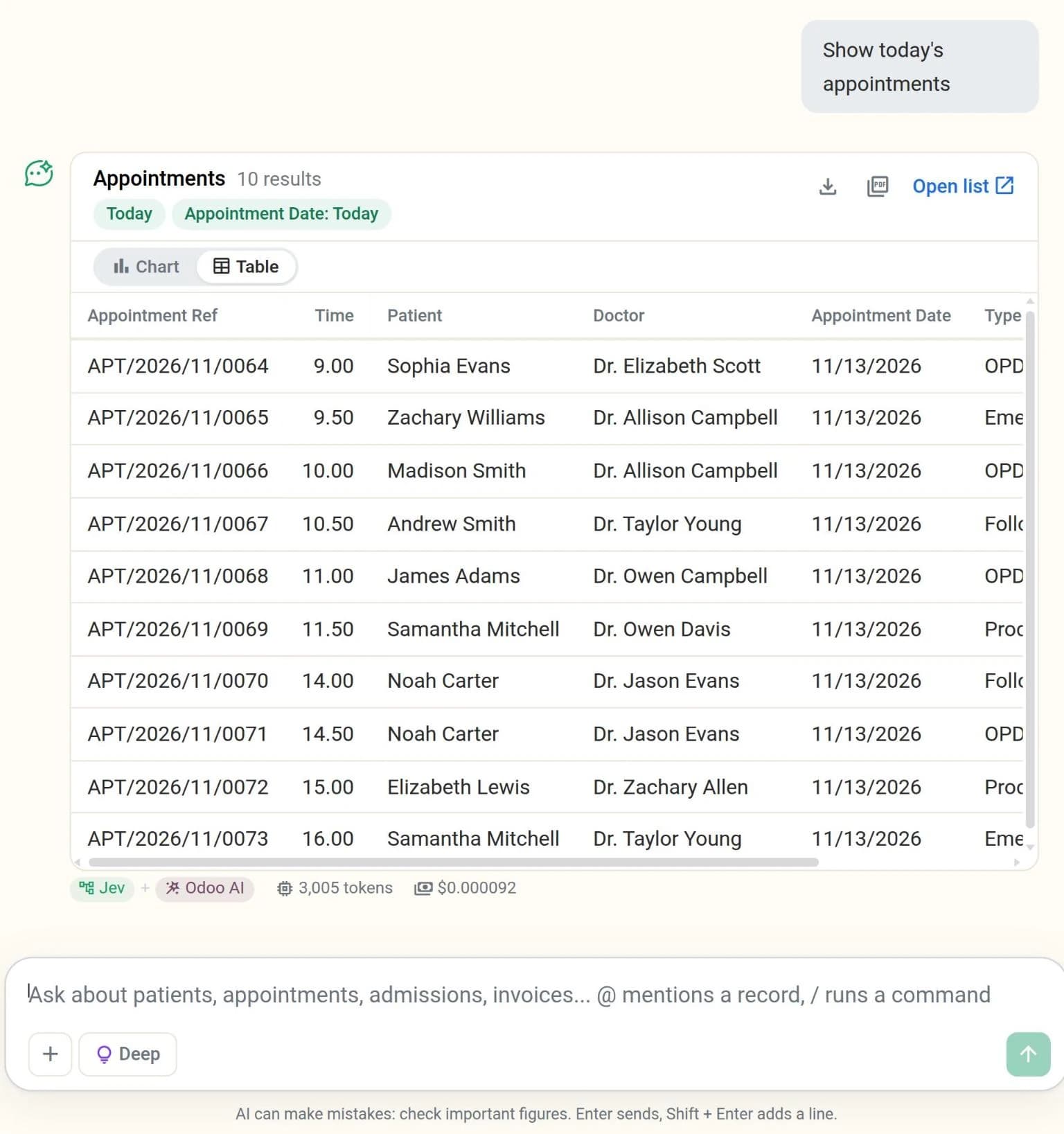
Type a question such as "show today's appointments" and get the matching records back as a table or a chart, with the filters it applied shown above them and a link to open the same list in Odoo.
"OPD invoices this month" means the invoices the OPD Invoices menu shows, and "nurses" means the staff on the Nurses list. It also understands patient ages ("patients over 60") and ward names or codes in a question.
Odoo reads the records as the signed-in user, so access rights and record rules apply: nobody sees more through the assistant than they could on screen.
Each answer shows the tokens and the OpenRouter cost it used, and "How I worked it out" lists the steps it took, so you can check how it got there.
A floating chat button opens the assistant from anywhere in the backend. Answers export to PDF or Excel. It can also draft new records (an administrator can switch that off) and, once voice is switched on, answer spoken questions.
EVERY ROLE, ONE SYSTEM
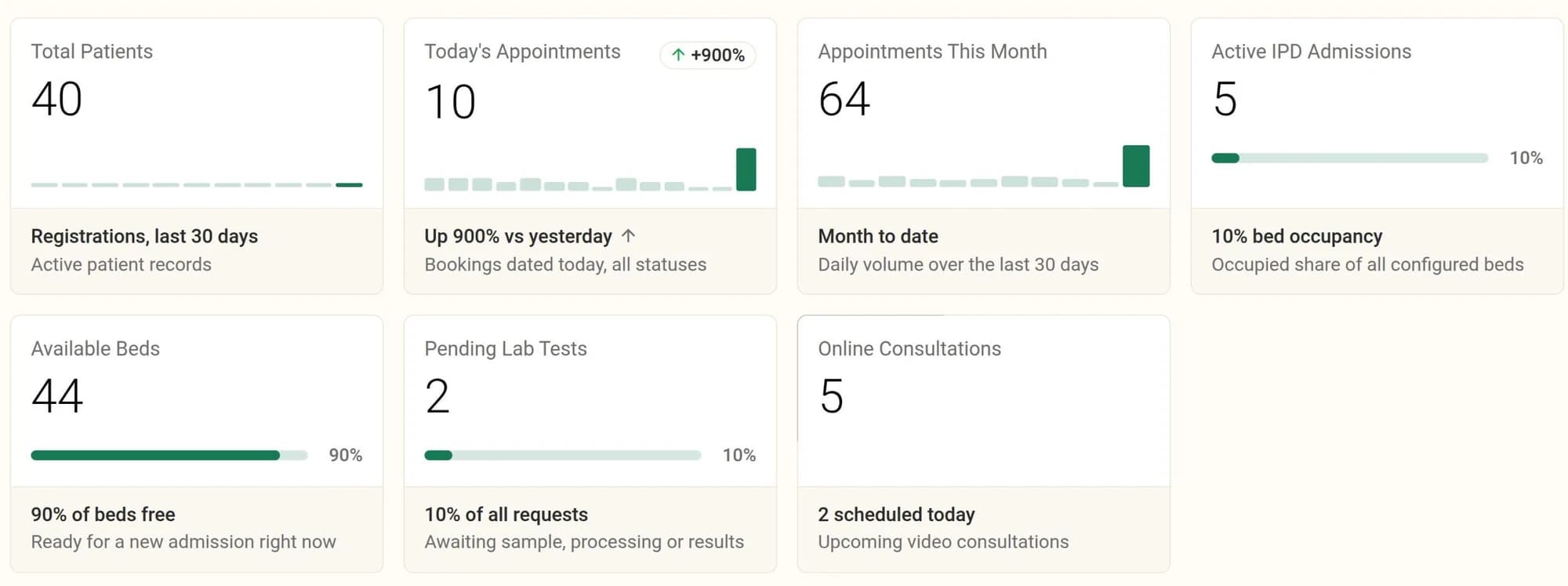
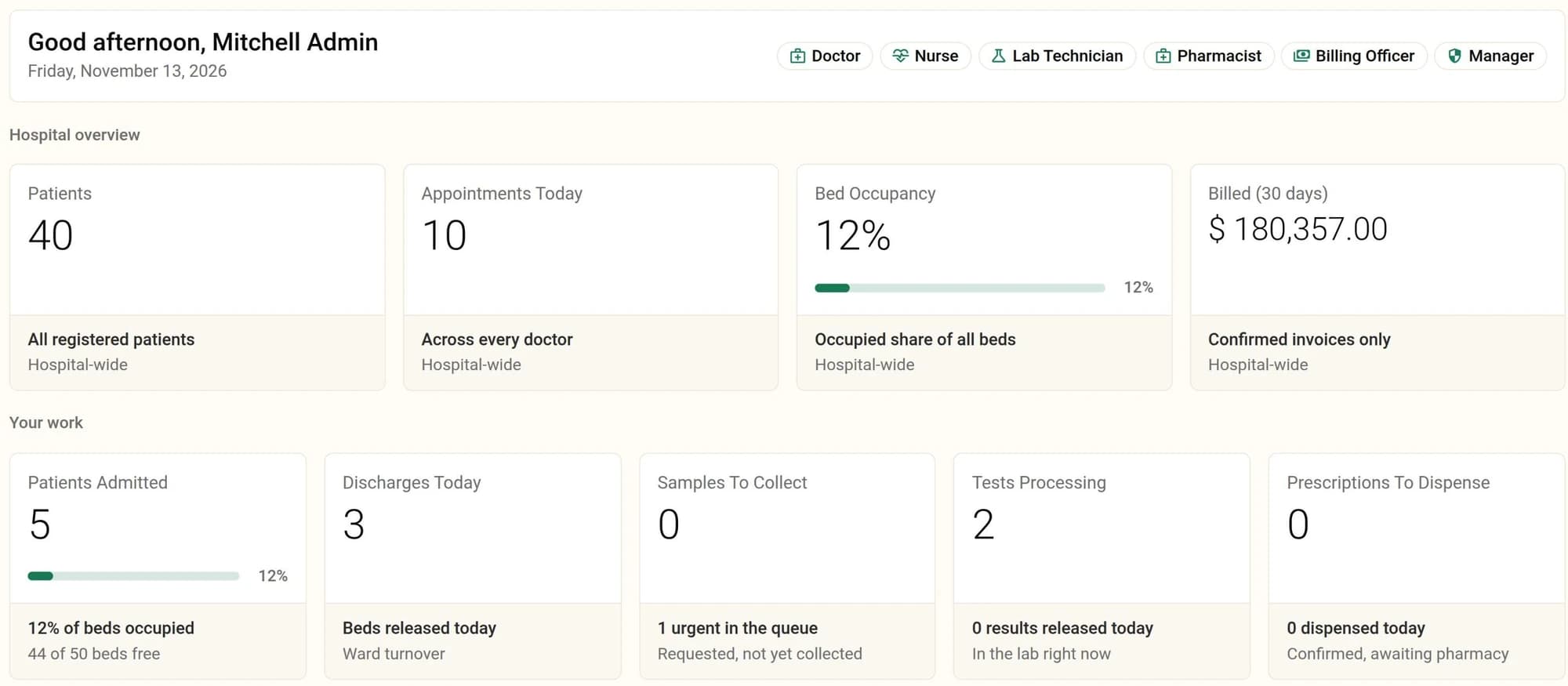
Staff are Odoo employees with a hospital role: doctor, nurse, receptionist, lab technician, pharmacist, billing officer or hospital manager. The role grants the matching access, and My Dashboard puts together the figures and queues for the roles each person holds. The main flows, as the system runs them:
REPORTS
Four reports, Billing / Revenue, Patient Visit / OPD, IPD Admission / Discharge and Lab Test, open a level at a time down to the records themselves, with filters for period, doctor, status, insurer and more. Each prints as a PDF or exports to Excel, and each role sees only the reports it is allowed to.
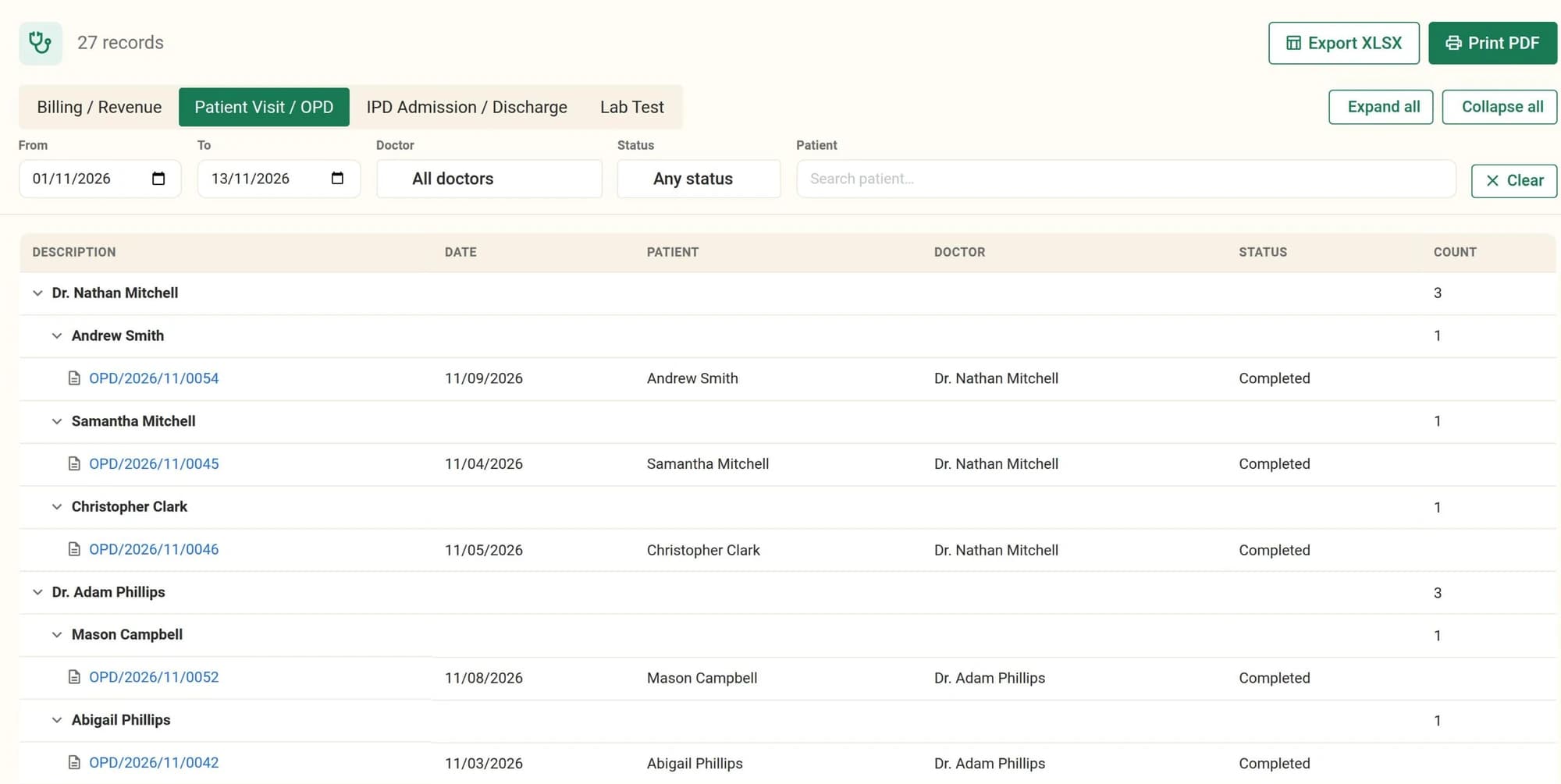
The screen, the PDF and the spreadsheet are built from the same query, so the three always agree.
Why this platform
The hospital modules are LGPL-3. Own the code and change the workflows, prices or screens yourself, without a vendor change request.
Staff are Odoo employees, medicines are Inventory products and every bill is an Odoo invoice, so accounting and stock work the way Odoo already does.
Seven hospital roles, each with its own menus and rights, so the front desk, clinicians, lab, pharmacy and billing each see their own work.
A started consultation, an admitted stay, a confirmed prescription or a finished lab result can't be deleted, only cancelled, so the history stays on the record.
Ships with 48 specializations, 40 lab tests, 14 insurers and the hospital departments, so a new hospital starts from a filled-in setup.
The Hospital Theme lays Odoo out with a permanent left sidebar, adds a dark mode switch to the top bar, and takes an accent colour from Settings.
FAQ
Patient registration, appointments, OPD consultations with vitals and prescriptions, IPD admissions and discharges, wards and beds, laboratory requests and results, pharmacy dispensing, billing with insurance, online video consultations, referrals between doctors, staff roles, dashboards and reports.
No. There is no HL7, FHIR or DICOM integration and no link to imaging (PACS) systems. Clinical data such as vitals, diagnoses, prescriptions, lab results and discharge summaries is recorded inside Odoo, on the patient's visits and admissions.
Each insurer has a default coverage percentage. When an invoice carrying an insurer is posted, every line is split between the patient and a second invoice addressed to the insurer, and both are posted together. Claims are not submitted to insurers electronically: the insurer invoice is sent and paid like any other Odoo invoice.
Not in this suite. Appointments are booked by staff in the Book Appointment screen. Patients join online video consultations from an emailed link without an account, but there is no public self-booking page.
Doctors can look up patients, but they see and work only on their own appointments, consultations, admissions, prescriptions and lab requests, and they can't record a consultation or admission under another doctor's name. Hospital managers see everything.
Medicines are Odoo Inventory products. When a pharmacist dispenses a confirmed prescription, a delivery order is created and validated for those medicines, so stock goes down at the moment they leave the pharmacy.
Beds change status through the admissions themselves: admitting a patient marks the bed occupied, and discharging or cancelling the stay frees it. Beds can also be set to reserved or under maintenance, and each ward shows its occupancy from those statuses.
Nothing outside Odoo. Calls run on Odoo Discuss's built-in video, and the patient's invitation goes out by email, so the instance needs outgoing mail set up for the invitation to arrive.
Medico AI is a separate, optional module. An administrator has to set an OpenRouter API key in its settings before it answers, and by default it also uses Odoo's own AI service, which can be switched off there. It reads data as the signed-in user, so it can only answer from what that user is allowed to see. Like any AI, it can get an answer wrong, so check important figures against the records it links to.
Run patients, consultations, wards, lab, pharmacy and billing from one hospital record.